
Delivery SLA Configuration
Overview
The Delivery SLA (Service Level Agreement) section is a critical configuration interface that allows businesses to define lead times for different delivery scenarios. It supports rule-based SLA definitions to manage delivery expectations across products, shipping methods, stock availability, and fulfillment models. This ensures better transparency, improves customer satisfaction, and streamlines backend logistics operations.
Key Functionalities
- Define delivery SLAs at both Organization and Product level.
- Configure rules based on Fulfillment Channel, Shipping Method Type, and Stock State.
- Assign Lead Times with flexible time units (e.g., Days, Weeks).
- Maintain visibility of delivery expectations in relation to product availability (e.g., Stock, BackOrder, PreOrder, Dropship).
UI Components
1. Delivery SLA Listing Page
This is the main screen where all configured SLA rules are displayed in a tabular format.
Columns
| Column Name | Description |
|---|---|
| Rule Type | Defines whether the rule is to Include or Exclude the SLA logic. |
| Config Level | Scope of the rule – either Org (organization-level) or Product (identified by product ID). |
| Delivery Type | Currently supports HomeDelivery. |
| Shipping Method Type | Options include Standard, Express, etc. |
| Fulfilment Channel | Represents how the order will be fulfilled – values include: Stock, BackOrder, Dropship, PreOrder. |
| Stock State | Indicates if the item is InStock or None. |
| Lead Time | Defines the time to deliver an order under specified conditions. Shown in Days or Weeks. |
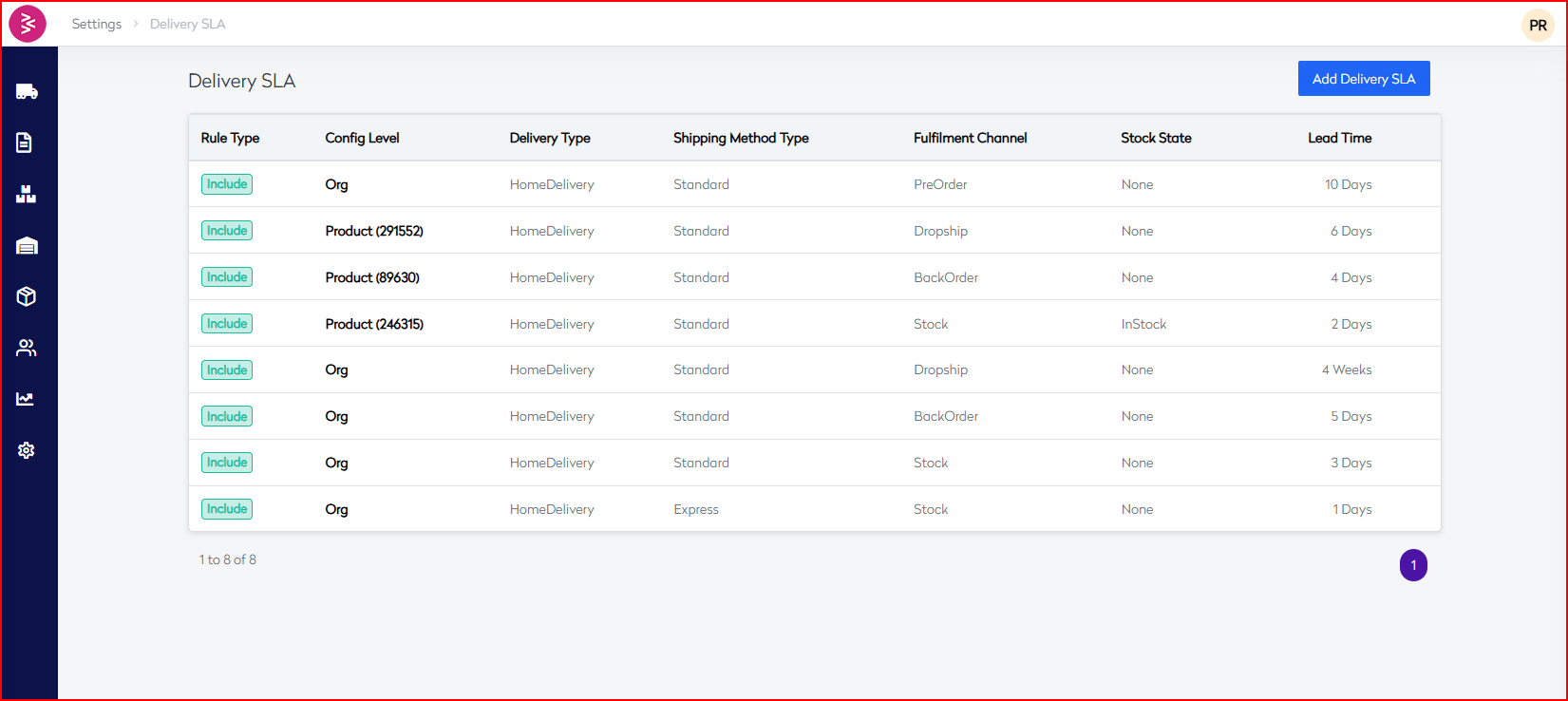
Add Delivery SLA
Overview
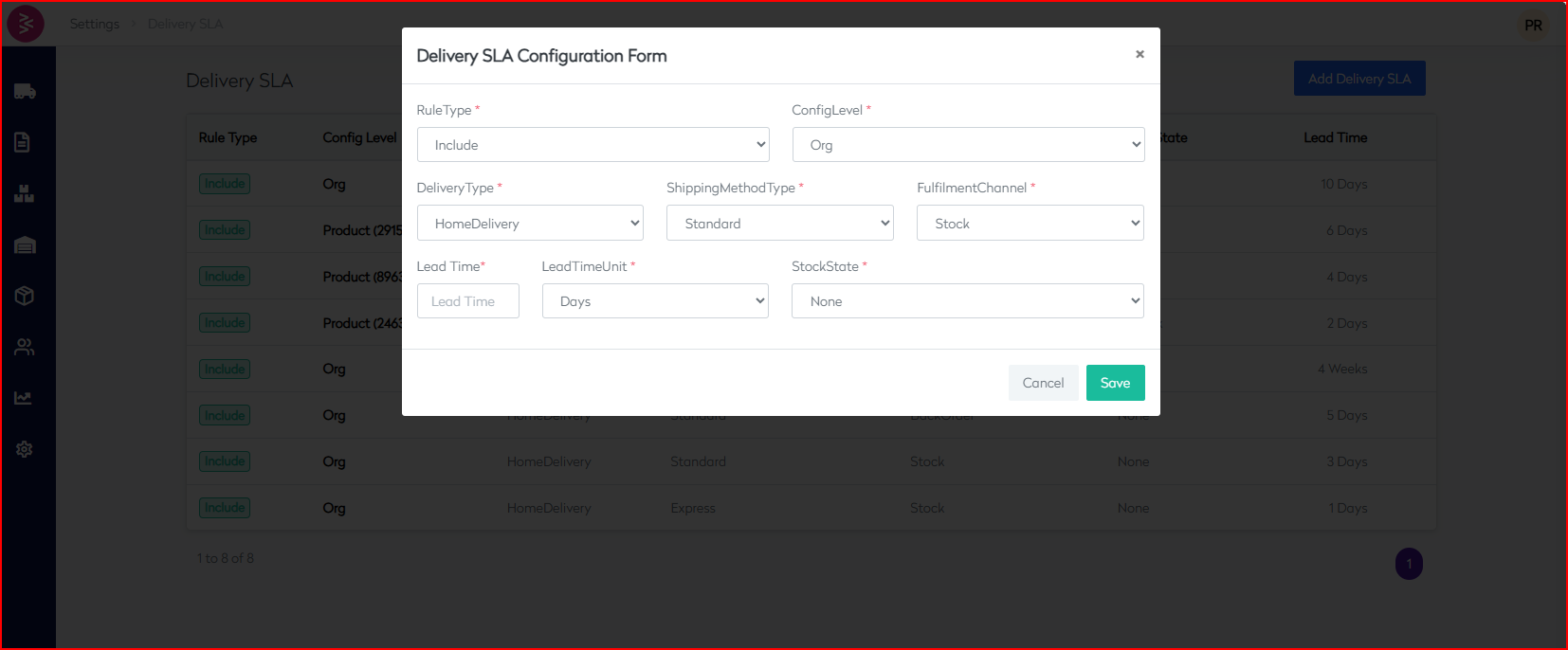
The Add Delivery SLA feature allows users to define new delivery rules using configurable parameters such as config level, fulfillment channel, shipping method, and lead time. These rules help set accurate delivery expectations and align fulfillment processes across the organization.
Access
Navigation Path: Settings → Delivery SLA → Add Delivery SLA
Form Fields
| Field Name | Type | Required | Description |
|---|---|---|---|
| Rule Type | Dropdown | ✅ | Defines the rule type. Supported value: Include. |
| Config Level | Dropdown | ✅ | Scope of the rule: Org (organization-wide) or specific Product (ID). |
| Delivery Type | Dropdown | ✅ | Currently supports: HomeDelivery. |
| Shipping Method Type | Dropdown | ✅ | Delivery method: e.g., Standard, Express. |
| Fulfilment Channel | Dropdown | ✅ | Options include: Stock, BackOrder, PreOrder, Dropship. |
| Stock State | Dropdown | ✅ | Inventory status: None, InStock. |
| Lead Time | Input | ✅ | Numeric value for delivery lead time. |
| Lead Time Unit | Dropdown | ✅ | Unit for lead time: Days, Weeks. |
Actions
- Save: Creates the SLA entry with specified parameters.
- Cancel: Discards the changes and closes the form.
Example
To define a 4-day SLA for Product ID 89630 using standard shipping on backorder:
| Field | Value |
|---|---|
| Rule Type | Include |
| Config Level | Product (89630) |
| Delivery Type | HomeDelivery |
| Shipping Method Type | Standard |
| Fulfilment Channel | BackOrder |
| Stock State | None |
| Lead Time | 4 |
| Lead Time Unit | Days |
Best Practices
- Use product-level rules only for exceptions.
- Always define a fallback Org-level SLA.
- Keep lead times updated based on seasonality or supply chain performance.