
Shipping Rule Management
Overview
Shipping rules in BetterCommerce Order Management System (OMS) define how shipping labels are generated for customer orders. This feature ensures accurate logistics handling by linking each rule to a specific carrier and delivery service.
Accessing Shipping Rules
Navigation Path:
- Go to:
Settings > Shipping Rules
Direct URL:
https://oms.bettercommerce.io/Setting/ShippingRule
Purpose
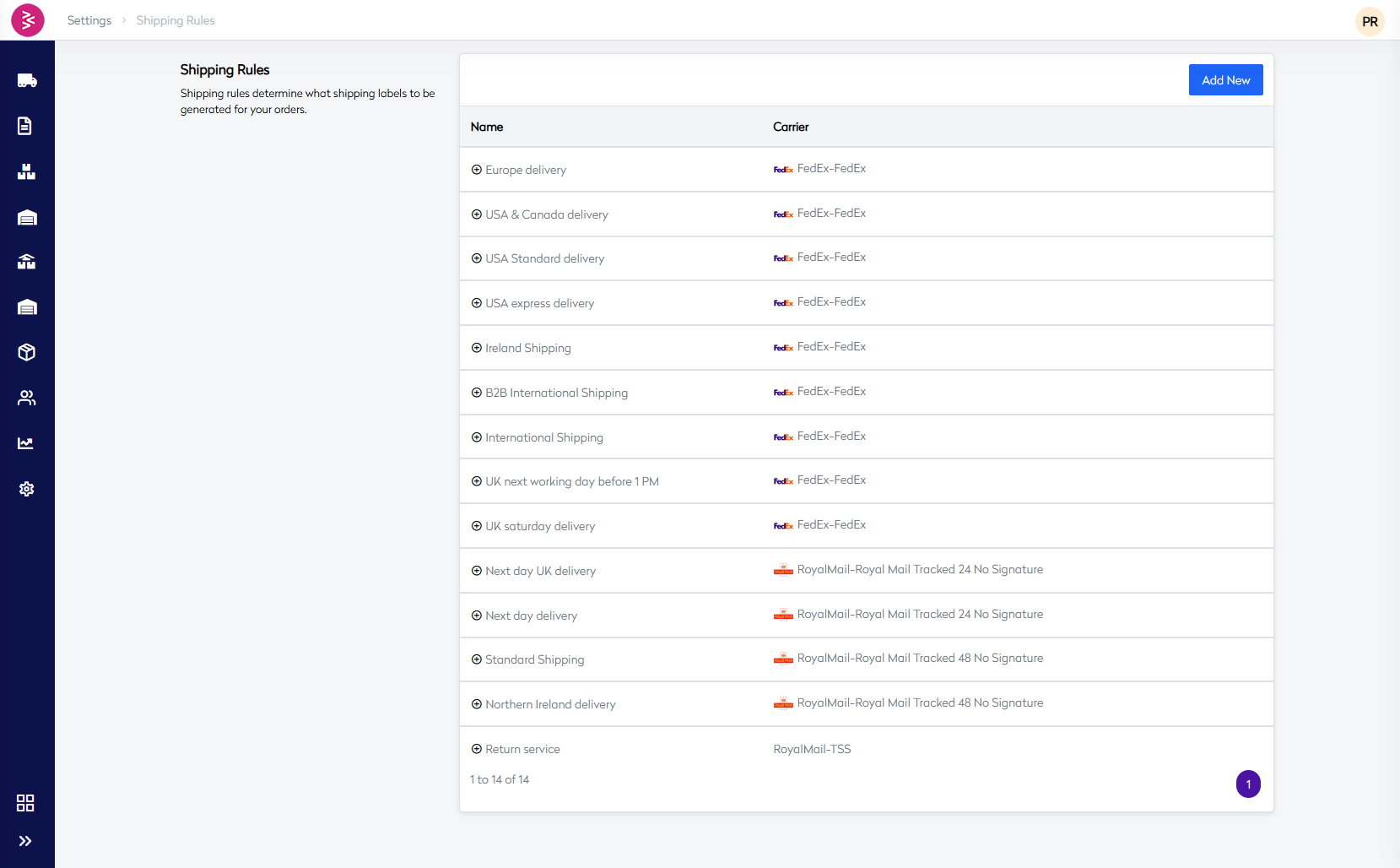
The Shipping Rules section allows operations and logistics teams to manage shipping services across various regions by configuring different delivery options tied to third-party carriers like FedEx and Royal Mail. These rules govern how shipping methods are applied during order fulfillment.
Key Features
- Add new shipping rules using the "Add New" button.
- Assign each rule to a designated carrier and service level.
- Enable region-specific and service-specific shipping strategies.
- Use rule names that clearly indicate delivery timelines and service areas.
Best Practices
- Use consistent naming conventions for clarity.
- Regularly review and update rules based on carrier service changes.
- Map rules appropriately to shipping zones for accuracy in label generation.
Use Cases
- Defining separate rules for B2B vs. B2C orders.
- Offering expedited shipping like next-day or express delivery.
- Managing returns with dedicated reverse logistics services.
Add Shipping Rule Configuration
Overview
The Add Shipping Rule functionality in the BetterCommerce OMS (Order Management System) allows administrators to configure shipping rules that determine which shipping labels are generated for orders. This system provides granular control over shipping methods, carriers, and services based on configurable conditions.
Purpose
Shipping rules serve as the foundation for automated shipping label generation, ensuring that orders are processed with the appropriate shipping methods based on predefined business logic and customer requirements.
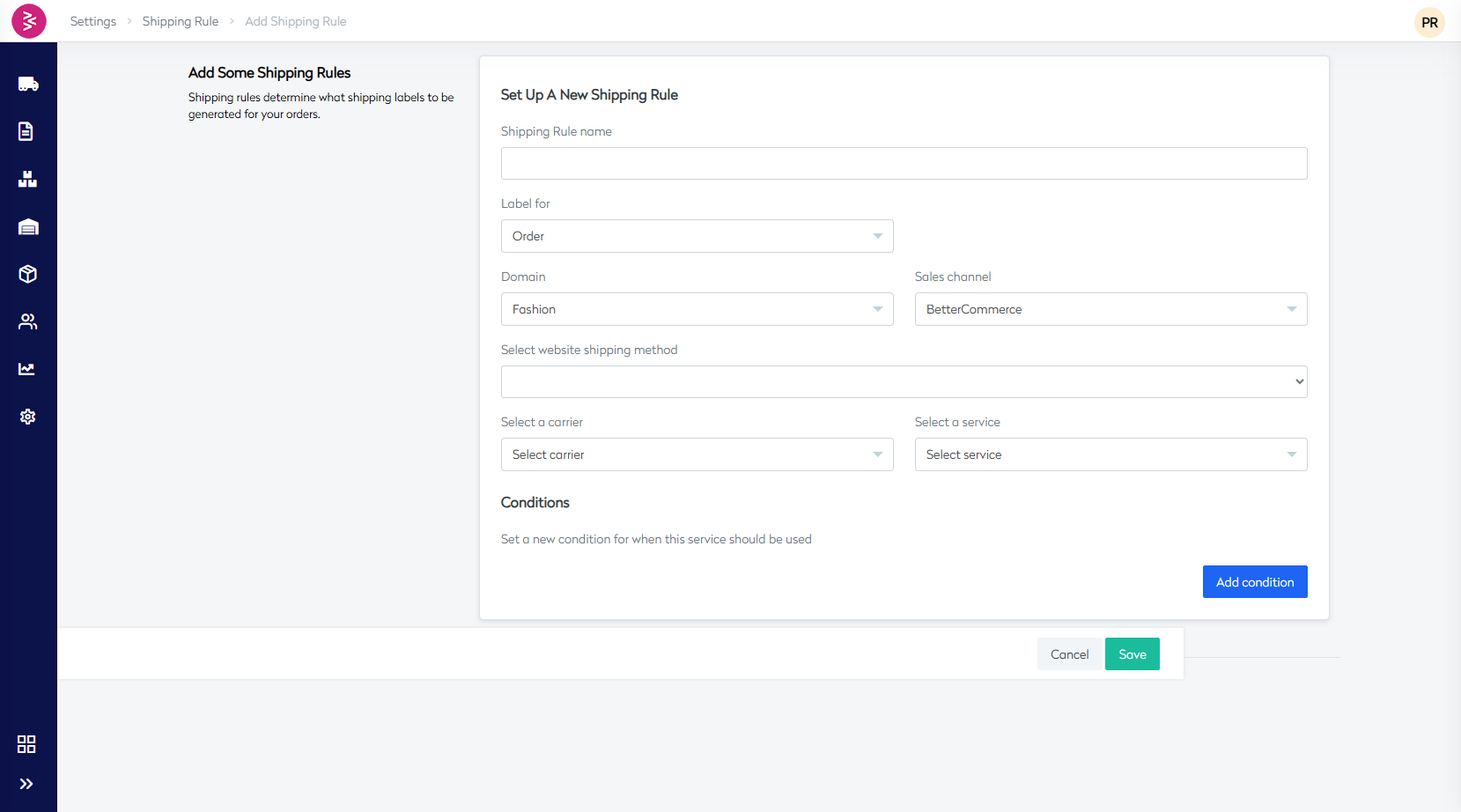
Shipping Rule Configuration - Field Definitions
| Field Name | Field Type | Required | Default Value | Description | Purpose | Validation Rules |
|---|---|---|---|---|---|---|
| Shipping Rule Name | Text Input | Yes | Empty | Unique identifier name for the shipping rule configuration | Internal reference for rule management and identification | Must be unique, alphanumeric characters allowed |
| Label For | Dropdown | Yes | Order | Defines the entity type for which shipping labels will be generated | Determines scope of label generation (Order level) | Must select from predefined options |
| Domain | Dropdown | Yes | Fashion | Business domain/brand to which this shipping rule applies | Enables multi-domain shipping rule management | Must select from configured domains |
| Sales Channel | Dropdown | Yes | BetterCommerce | Sales channel where this shipping rule will be applied | Channel-specific shipping configurations | Must select from available sales channels |
| Select Website Shipping Method | Dropdown | Yes | None selected | Customer-facing shipping method that will be displayed and used | Links customer selection to backend shipping processing | Must select from configured shipping methods |
| Select a Carrier | Dropdown | Yes | Select carrier | Logistics provider/courier company for shipment delivery | Determines which carrier will handle the physical shipment | Must select from integrated carrier list |
| Select a Service | Dropdown | Yes | Select service | Specific service level within the selected carrier | Defines delivery speed, features, and SLA for shipments | Options populate based on selected carrier |
| Conditions | Condition Builder | No | No conditions set | Business logic rules that determine when this shipping rule applies | Enables conditional application based on order, customer, or product criteria | Must follow proper condition syntax if configured |
Available Shipping Methods Reference
Shipping Methods List
| Shipping Method Code | Display Name | Geographic Coverage | Delivery Timeframe | Carrier Indicator |
|---|---|---|---|---|
| EU-UPS | Europe(EU-UPS) | European Union | Standard | UPS |
| MP7 | Free Delivery 4 working days(MP7) | Domestic | 4 working days | MP7 |
| UK-NBD-TPNS | Next Day UK Delivery(UK-NBD-TPNS) | United Kingdom | Next Business Day | TPNS |
| SD-IE-MP7 | Northern and Rep. of Ireland(SD-IE-MP7) | Ireland | Standard Delivery | MP7 |
| TPSS | Standard Delivery(TPSS) | Domestic | Standard | TPSS |
| UPS | Standard Delivery(UPS) | Various | Standard | UPS |
| UPS-EU-Z3 | Standard Delivery-Eu Zone 3(UPS) | EU Zone 3 | Standard | UPS |
| STD | Standard Shipping(STD) | General | Standard | Generic |
| UK-SD-TPSS | Standard UK Delivery(UK-SD-TPSS) | United Kingdom | Standard | TPSS |
| TPNS | UK Next Day (Mon-Fri)(TPNS) | United Kingdom | Next Day (Mon-Fri) | TPNS |
| UK-NBD-UPS | UK Next Working Day Before 1 PM(UK-NBD-UPS) | United Kingdom | Next Working Day by 1 PM | UPS |
| SD-UK-UPS | UK Saturday Delivery(SD-UK-UPS) | United Kingdom | Saturday Delivery | UPS |
| US-CA-UPS | USA & Canada(US-CA-UPS) | USA & Canada | Standard International | UPS |
| US-EXPRESSFED | USA Express(US-EXPRESSFED) | USA | Express | FedEx |
| US-FEDEX | USA Standard(US-FEDEX) | USA | Standard | FedEx |
| WW-UPS | Worldwide(WW-UPS) | Worldwide | International Standard | UPS |
Shipping Rule - Action Buttons
| Action Button | Type | Function | Validation Required |
|---|---|---|---|
| Add Condition | Primary Action | Opens condition builder to add business logic rules | No |
| Save | Submit Action | Saves the shipping rule configuration to the system | Yes - All required fields must be completed |
| Cancel | Secondary Action | Discards changes and returns to shipping rule list | No |
Once a new rule is created