
Edit Delivery SLA
Overview
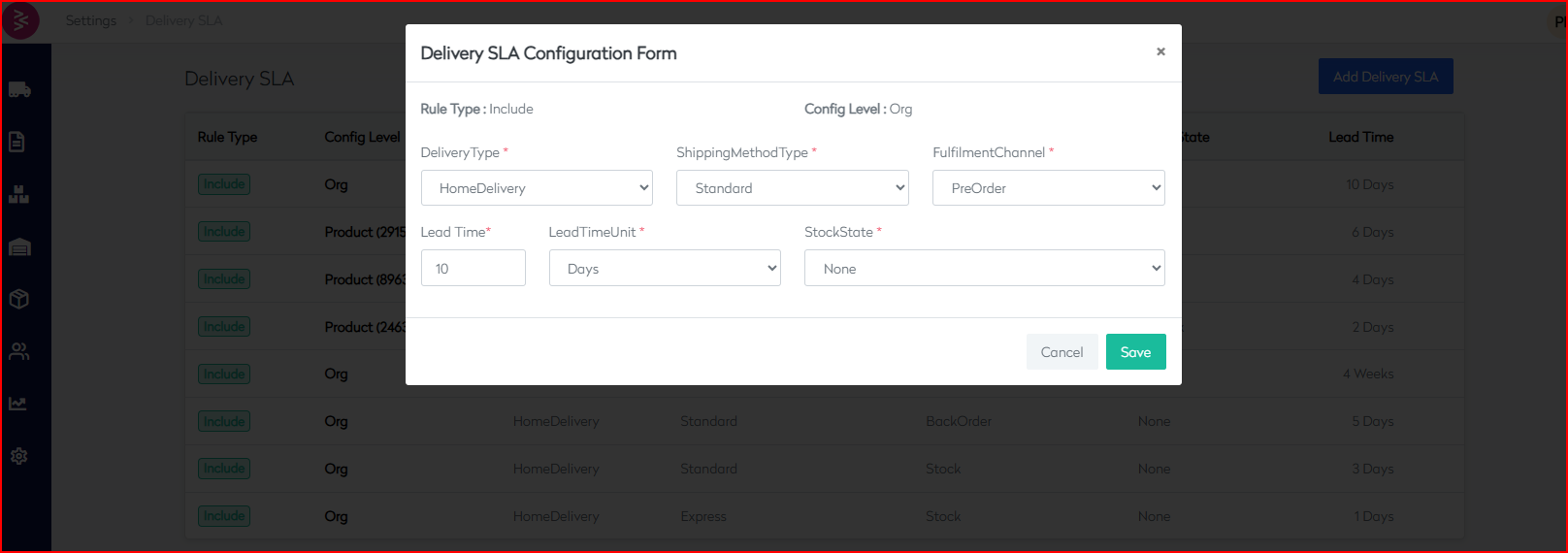
The Edit Delivery SLA feature enables users to update existing SLA entries to reflect changes in delivery timelines, stock availability, or fulfillment policies. This ensures SLAs stay aligned with actual business operations.
Access
Navigation Path: Settings → Delivery SLA → Click on an existing SLA rule
Editable Fields
All the fields used during the creation of an SLA can be modified:
| Field Name | Editable | Description |
|---|---|---|
| Rule Type | ✅ | Modify the rule type (e.g., Include). |
| Config Level | ✅ | Change the scope to Org or a different Product ID. |
| Delivery Type | ✅ | Update delivery method like HomeDelivery. |
| Shipping Method Type | ✅ | Modify shipping options (Standard, Express). |
| Fulfilment Channel | ✅ | Change fulfillment mode such as Stock, Dropship, etc. |
| Stock State | ✅ | Update based on current stock configurations (None, InStock). |
| Lead Time | ✅ | Revise delivery time value. |
| Lead Time Unit | ✅ | Change time unit (Days, Weeks). |
Steps
- Locate the rule in the Delivery SLA table.
- Click on the entry to open the edit form.
- Update the required fields.
- Click Save to apply changes.
Example
To update an SLA from 3 days to 2 days for Org-level Stock delivery:
| Before | After |
|---|---|
| Lead Time | 3 |
| Unit | Days |
| New Lead Time | 2 |
Best Practices
- Log edits for auditing purposes.
- Avoid conflicting rules post-edit.
- Validate feasibility with logistics before reducing lead times.