
Master data Configuration
Overview
The Master data Configuration module in BetterCommerce's OMS enables users to define and manage standardized reasons for stock adjustments. This ensures clarity, audit compliance, and consistency in warehouse operations involving inventory modifications such as re-counting, PR (Product Return) movements, or photo shoot handling.
This documentation covers the UI flow, configuration details, and best practices for managing stock adjustment reasons.
Adjust Stock Reason Listing
Navigation
- Path:
Settings > Master Data Configurations > AdjustStockReason - URL:
/Setting/MasterDataConfigurations
Description
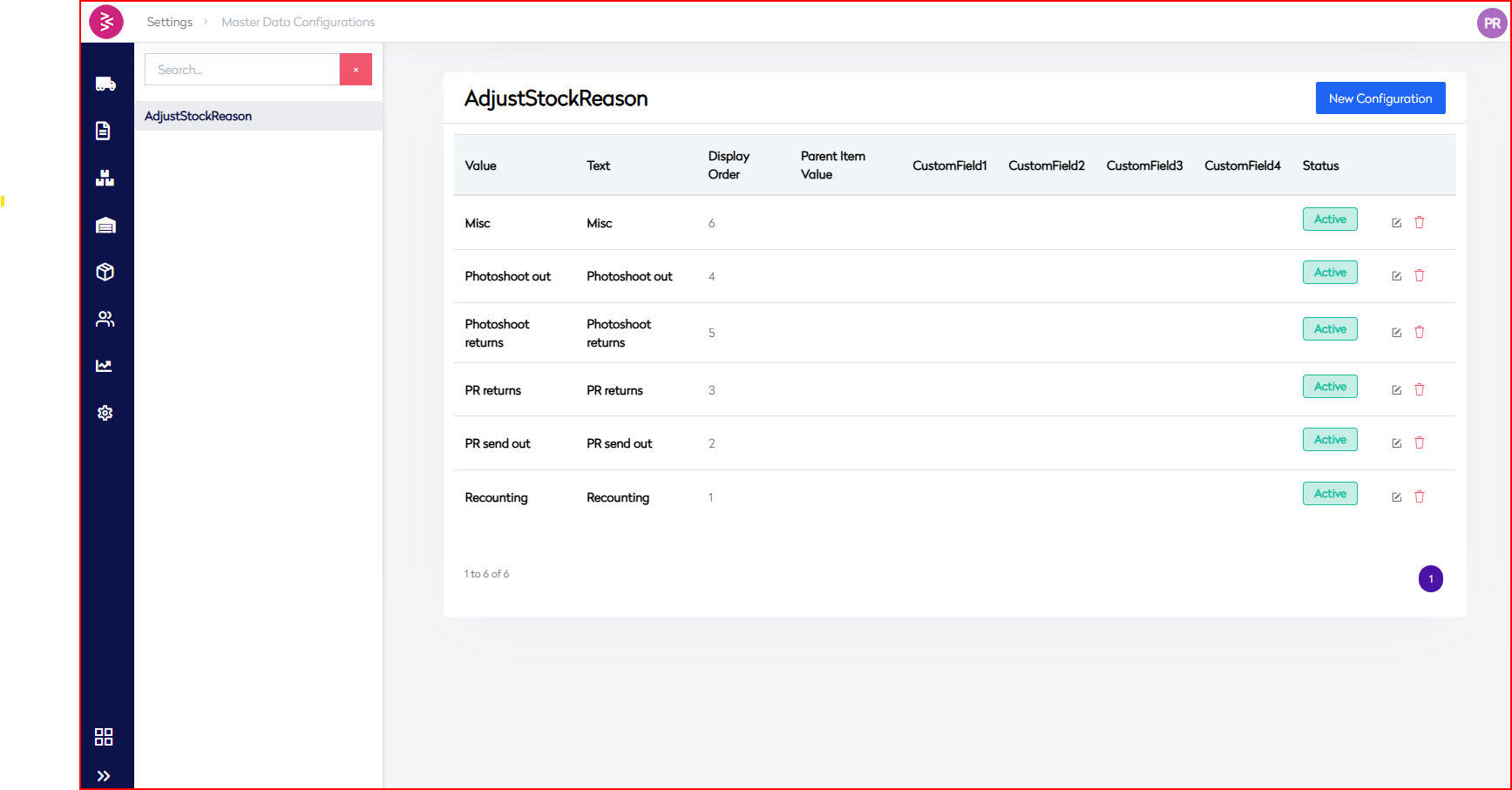
This listing screen displays all available stock adjustment reasons. These predefined reasons help categorize inventory changes performed manually or through automated workflows.
Grid Columns
| Column Name | Description |
|---|---|
| Value | Internal identifier or key used in the system |
| Text | Human-readable label describing the adjustment reason |
| Display Order | Numerical order for displaying entries in dropdowns or forms |
| Parent Item Value | Hierarchical linkage if the reason belongs to a broader category |
| CustomField1-4 | Optional fields for extensibility (e.g., department, system flags, tags) |
| Status | Indicates whether the configuration is currently Active or Inactive |
| Actions | Edit or delete icons to manage individual entries |
Sample Entries
| Value | Text | Display Order | Status |
|---|---|---|---|
| Misc | Misc | 6 | Active |
| Photoshoot out | Photoshoot out | 4 | Active |
| Photoshoot returns | Photoshoot returns | 5 | Active |
| PR returns | PR returns | 3 | Active |
| PR send out | PR send out | 2 | Active |
| Recounting | Recounting | 1 | Active |
Actions Available
- Edit (✏️): Opens a modal with the existing inventory type for update.
- Delete (🗑️): Available for user-created inventory types. Not allowed on system-critical or default types.
- Set as Default: Only one inventory type can be set as default.
Add New Stock Adjustment Reason
Access
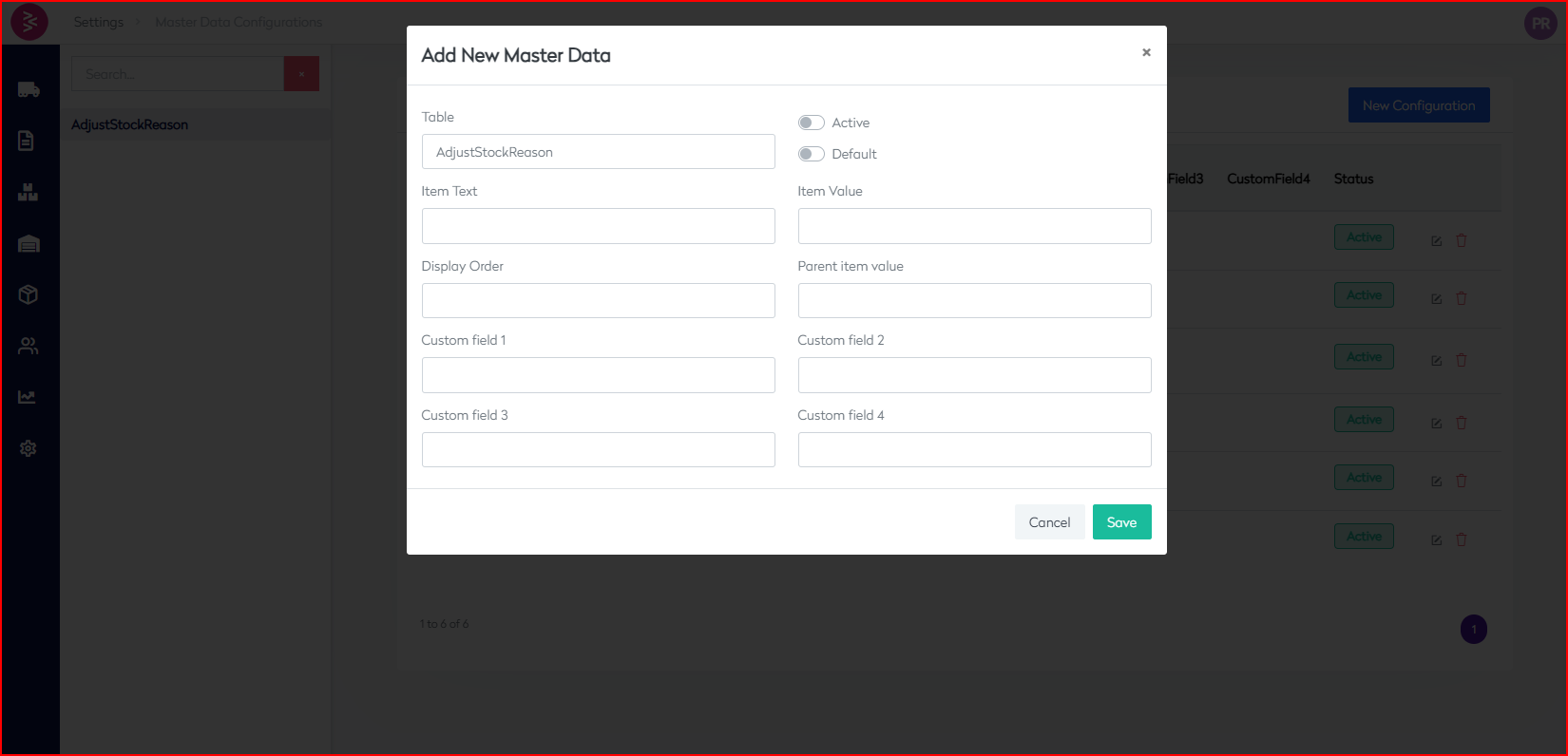
Click the New Configuration button at the top-right of the listing screen to open the master data creation form.
Form Fields
| Field Name | Description |
|---|---|
| Table | Pre-filled as AdjustStockReason to indicate the target configuration table |
| Item Text | User-friendly name (e.g., PR returns) shown across UI |
| Item Value | Internal system value (e.g., PR returns, must be unique) |
| Display Order | Order in which the item should be displayed in forms or dropdowns |
| Parent Item Value | Value of a parent configuration, if applicable (for hierarchy) |
| Custom Field 1-4 | Optional fields to store extended metadata |
| Active | Toggle to mark the reason as enabled/disabled in the system |
| Default | Toggle to mark this as the default reason (only one default allowed) |
Buttons
- Save: Persists the new configuration to the system.
- Cancel: Closes the modal without saving any input.
Business Rules & Guidelines
- Unique Value Requirement: Each entry must have a unique
Item Value. - Display Order Management: Use whole numbers (e.g., 1, 2, 3...) to maintain sort order.
- Default Behavior: Only one adjustment reason should be set as default.
- Audit Trails: Changes to reasons (add/edit/delete) should be logged in the system backend for traceability.
- Inactive Entries: Inactive values will be hidden from operational UIs but retained for audit/reference purposes.
- Extensibility: Use
CustomField1-4to map reasons to departments, tags, regions, or logic flags as per business needs.
Use Case Scenarios
| Scenario | Suggested Reason |
|---|---|
| Stock used for marketing | Photoshoot out |
| Item returned from campaign | Photoshoot returns |
| Customer return logging | PR returns |
| Loaning product for PR | PR send out |
| Physical stock verification | Recounting |
| Manual adjustments not mapped | Misc |
Future Enhancements
- Role-based configuration visibility/edit permissions
- Bulk import/export via CSV for large-scale changes
- Integration with stock adjustment logs for root cause analysis
- Audit and history tracking for each configuration change